Inventory Valuation
Overview
The Inventory Valuation module offers users a detailed financial overview of their inventory, providing insight into costs, margins, potential profits, and retail value. This enables data-driven decision-making for purchasing, pricing, and inventory management.
The module can be accessed via the Inventory menu in the Mwingi POS Back Office.

Inventory Valuation Summary View
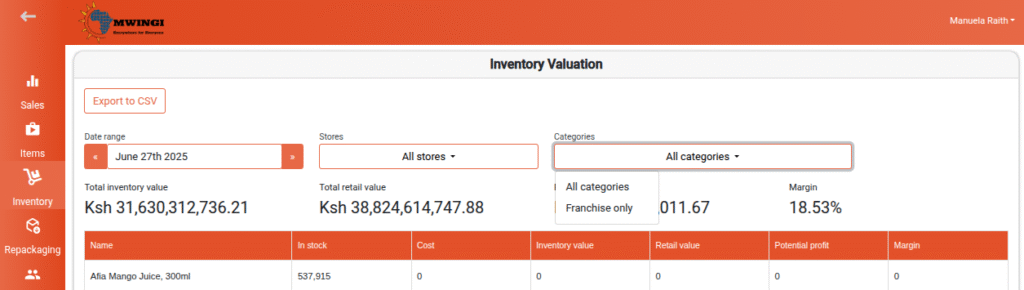
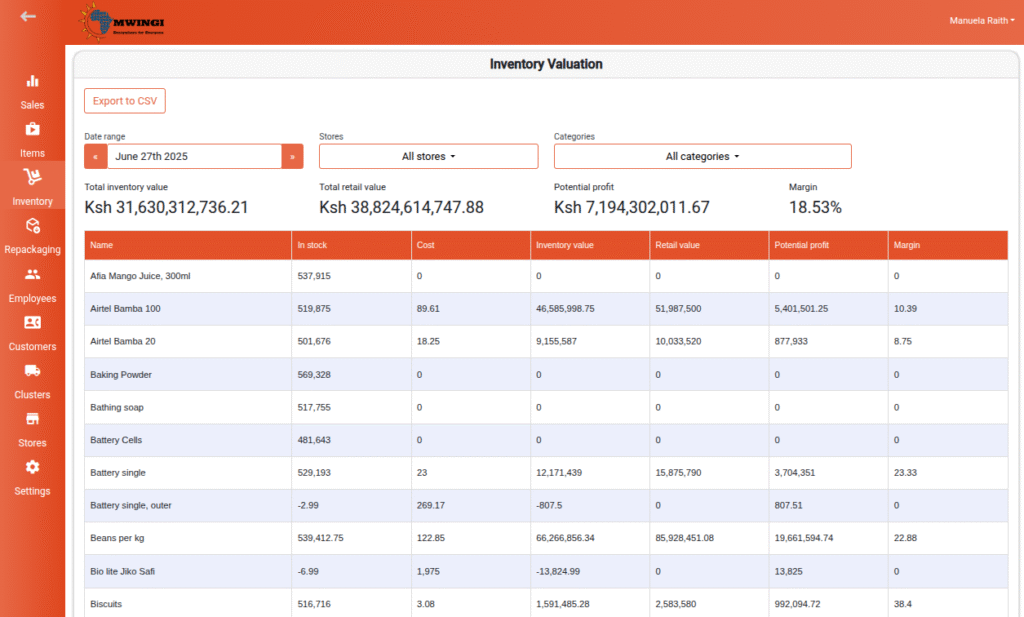
The summary screen displays high-level financial metrics that represent the overall value and profitability of the current inventory:
- Total Inventory Value – The combined cost of all items currently in stock
- Total Retail Value – The total potential revenue if all inventory items are sold at retail price
- Potential Profit – The estimated profit if all inventory is sold at retail, excluding operational costs
- Margin – The average gross margin percentage across all inventory items

Inventory Valuation Table View
A detailed table provides a product-level breakdown of inventory financials, including:
- Product Name – Name of the product
- In Stock – Current quantity available
- Cost – Unit cost of the item
- Inventory Value – Total cost value of current stock (Cost × Quantity)
- Retail Value – Total projected revenue if sold at retail (Retail Price × Quantity)
- Potential Profit – Estimated profit per item (Retail Value – Inventory Value)
- Margin – Gross profit margin percentage for each item
Filter Options
To enable targeted analysis and data retrieval, users can apply the following filters:
- Date Range – View valuation data within a specified date range
- Store Selection – Filter results by one or multiple stores
- Category Filter – Filter products by category:
- All Categories
- Franchise Only