
Cashiers
Overview
The Cashiers module manages records of all employees assigned the Cashier role. Authorized users can create, update, or delete cashier profiles to maintain accurate staffing and role-based system access.
This feature is available under the Employees menu in the Mwingi POS Back Office.

Cashiers Table View
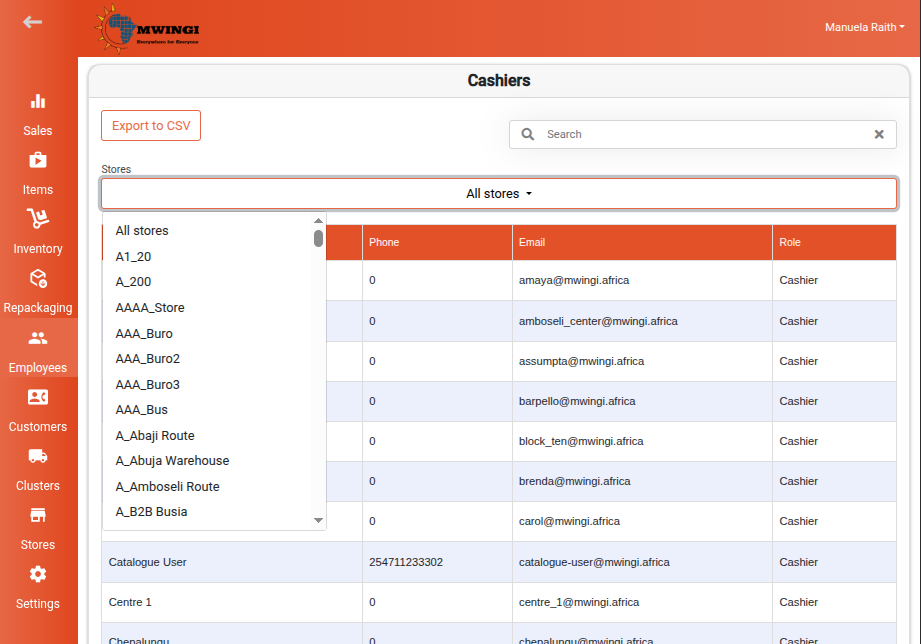
The system displays a structured table of all registered cashiers, with the following information:
- Name – Full name of the cashier
- Phone – Contact phone number
- Email – Email address
- Role – Set as Cashier by default
Search and Filtering
To quickly locate specific cashier records, users can:
- Filter by Store – Use the store dropdown to display cashiers assigned to selected store locations
- Search – Enter keywords (name, email, or phone number) in the search bar above the table
Export
To export the cashier list:
Click Export to CSV to download a CSV file containing all listed records
Editing a Cashier Record
To edit an existing cashier’s information:
- Click the desired cashier’s row in the table to open the Edit Cashier Form
- Update editable fields:
- First Name
- Last Name
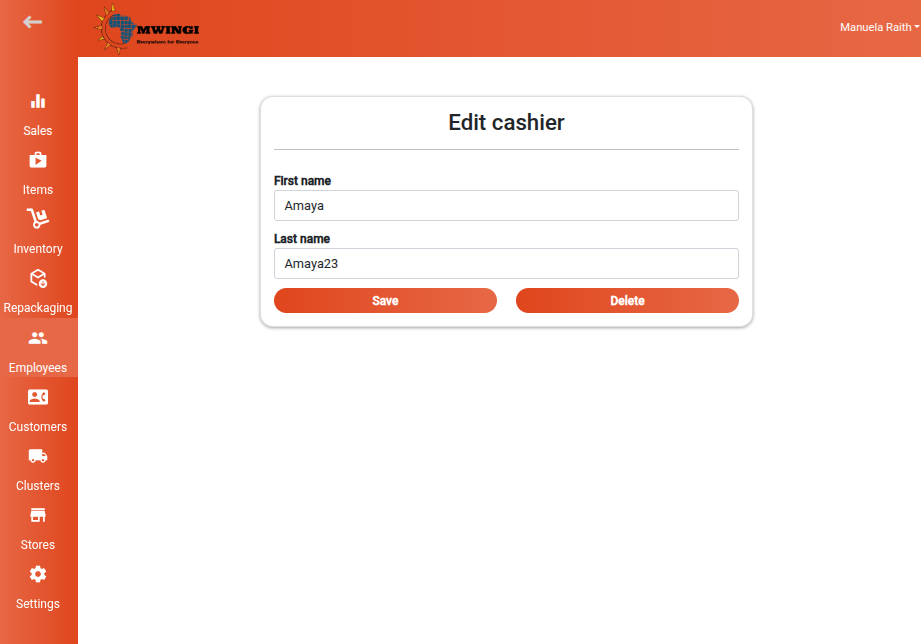
After making changes, click Save to apply changes.
Deleting a Cashier Record
To remove a cashier from the system:
- Open the Edit Cashier Form for the specific employee.
- Click Delete to permanently remove the cashier’s record.
