
Spotcheck Results
The Spotcheck Results module in the Mwingi Dashboard offers a centralized and real-time overview of stock count activities conducted by Field Representatives (FRs) using the Mwingi Spotcheck App. Each morning, FRs perform physical stock counts, and the results are synced to the dashboard for seamless monitoring and analysis.
This module plays a critical role in identifying discrepancies, ensuring inventory accuracy, and tracking sales performance across all stores.

Core Functionality
Spotcheck Results Table
The dashboard presents a structured table displaying spotcheck records for each store and product. Each row includes the following details:
| Field | Description |
|---|---|
| Product Name | The name of the product counted. |
| Status | Indicates the result of the stock count: – Shrinkage: Less than expected – Excess: More than expected – OK: Matches the expected quantity |
| Store Name | The store where the spotcheck was conducted. |
| Actual Stock Count | The system-recorded stock quantity before the spotcheck. |
| Counted Stock | The physical stock count submitted by the FR during the spotcheck. |
| Deviation | The difference between the actual stock and the counted stock. |
| Created Date | The date the spotcheck entry was created or recorded. |

Data Filtering Options
To streamline data access, the module includes various filtering tools:
- Date Range Filter: Select a start and end date to view results within a specific time frame.
- Status Filter: Filter by spotcheck outcome (All, Shrinkage, Excess, or OK).
- Store Filter: Display results for a specific store.
- Product Filter: Display results for a specific product.
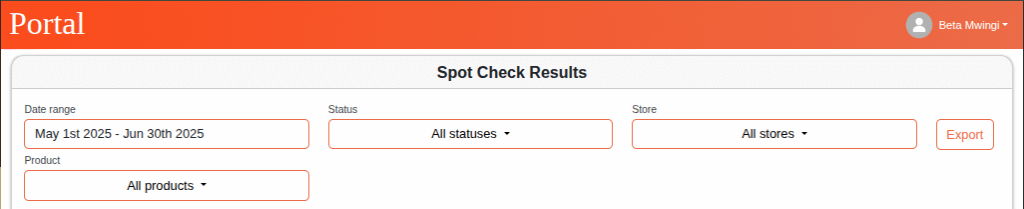
These filters allow users to efficiently locate relevant and actionable data.
Export and Data Management
- Export Functionality: Users can export the visible data in the table using the Export button above the table, enabling easy reporting and external analysis.

- Load More Button: Located below the table, this allows users to dynamically retrieve additional spotcheck records beyond the initial load.

Use Case Summary
The Spotcheck Results module supports:
- Real-time tracking of inventory checks conducted by FRs
- Quick identification of stock discrepancies (e.g., shrinkage or excess)
- Enhanced accountability and verification of physical stock counts
- Streamlined filtering and data export for audits and operational reporting
By centralizing stock count data, the Mwingi Dashboard empowers Operations Teams and Field Regional Officers (FROs) to maintain accurate inventory records and proactively manage discrepancies across the store network.